Chapter 8 of the VDPMill User Guide
VDPMill Control Panel
7.1. What is VDPMill Control Panel?
VDPMill Control Panel is a GUI application to run/stop/configure VDPMill XML-RPC Server and EnMasse. It runs VDPMill XML-RPC Server and EnMasse as background processes.
7.2. Launching VDPMill Control Panel
To open VDPMill Control Panel, launch the vdpmill-control-panel script (the vdpmill-control-panel.bat batch file for MS Windows) in the /bin directory located in the VDPMill installation directory.
7.3. Configuring and Running XML-RPC Server
VDPMill Control Panel displays the status of XML-RPC Server and its parameters on the XML-RPC Server tab. To run/stop/restart the VDPMill XML-RPC Server press Start/Stop/Restart buttons on the XML-RPC Server tab.
Figure 7.1. VDPMill Control Panel XML-RPC Server Configuration
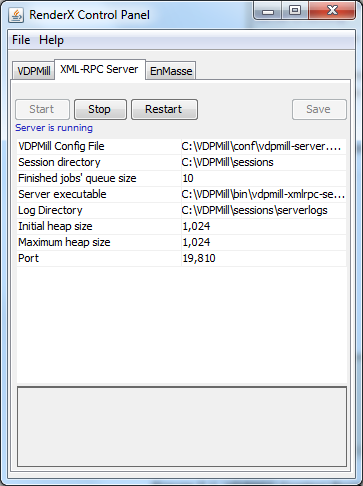
VDPMill Control Panel allows to change configuration parameters via GUI. After parameter changes it is necessary to save changes and restart the server. Press Save button to save parameter changes. For detailed information about configuration parameters see Section 2.4, “ controlpanel.conf Description ”.
If a firewall is used to allow/deny network connections, the TCP port for VDPMill XML-RPC Server must be allowed for incoming connections from the local host.
7.4. Configuring VDPMill Core Parameters
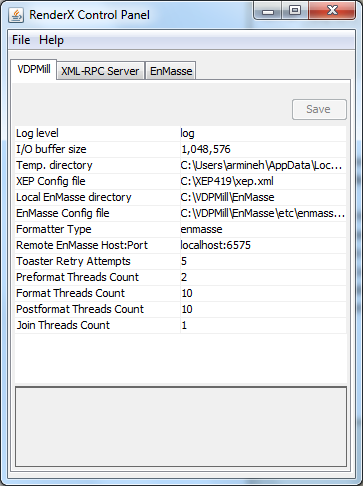
VDPMill Core Parameters are displayed on the VDPMill tab in the control panel application. It is necessary to save parameters and restart the XML-RPC Server and EnMasse (if EnMasse-related parameter is changed and EnMasse is selected as formatter - Formatter Type = enmasse). For detailed information about VDPMill Core configuration parameters, see Section 2.2, “ vdpmill.conf Description”.
Figure 7.2. VDPMill Core Parameters displayed in VDPMill Control Panel
7.5. Configuring and Running EnMasse
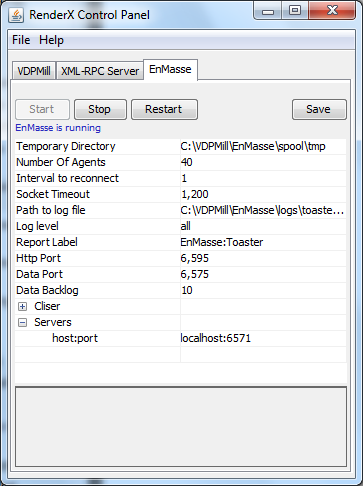
EnMasse tab contains Start, Stop and Restart buttons to control the EnMasse processing and options table to change EnMasse configuration parameters. After any changes it is necessary to save the configuration changes and restart EnMasse. For detailed information about EnMasse configuration parameters see EnMasse User Guide
Figure 7.3. VDPMill Control Panel EnMasse Configuration