
Chapter 6 of the VDPMill User Guide
VDPMill Ticket Application
5.1. What is VDPMill Ticket Application?
VDPMill Ticket Application (VDPMillTicket) is a GUI tool to create VDPMill Job Ticket files. To launch the application run vdpmill-ticket script (the vdpmill-ticket.bat batch file for MS Windows) in the /bin directory located in the VDPMill installation directory.
Figure 5.1. VDPMillTicket Application Interface
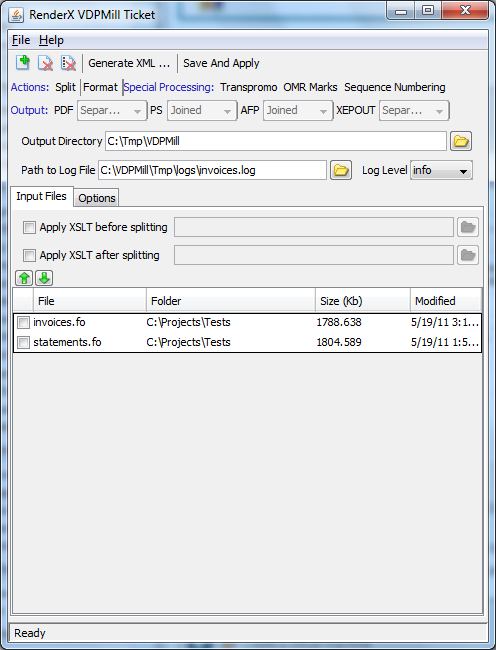
This application is a light-weight variation of VDPMill Interactive application and has a simple user interface to specify input files, pre/post-split stylesheet paths, desired actions, output targets, output directory, splitting options, options for output formats, output directory, path to log file, log level and special processing options.
VDPMillTicket (as well as VDPMill Interactive) saves projects as VDPMill Job Ticket format files. For VDPMill Job Ticket format description see Appendix C, Job Ticket Format Description**.
Once the ticket file is created it can be processed by pressing Save And Apply button or using VDPMill CLI tool (Chapter 9, VDPMill Command Line Interface), VDPMill Control Panel (Chapter 7, VDPMill Control Panel**), VDPMill XML-RPC Client CLI tool (Section B.2, “XML-RPC Client ”).