
Chapter 17 of the IREn User Guide
Accessibility Support in IREn
G.1. Overview
This section contains the following topics:
-
Accessibility Support in IREn
-
Tagged PDF
-
RenderX IREn
rolemap.xml-
XSL-FO Extensions
-
PDF Structure Tag
-
PDF Artifact Type and Subtype
-
Alternate Description
-
Actual Text
-
Abbreviations
-
Tables
-
-
Hints and Tips
-
Using rolemap.xml
G.2. Accessibility Support in IREn
IREn can create accessible PDF documents that are in compliance with Section 508 Standards (http://www.section508.gov)
This feature is controlled by the ENABLE_ACCESSIBILITY core option in the configuration file that ships with IREn named xep.xml.
Note: Accessibility support is applied to PDF documents only.
The major requirements for accessible PDF documents are the following:
-
Logical reading order
-
Alternate text descriptions for images
-
Document language
An accessible PDF document should include the document's default language which applies to all text in a PDF document. A document's default language should be specified on <fo:root> element using xml:lang attribute. You can change a language on descendant elements by overriding the document's language.
G.3. Tagged PDF
Note: The syntax for the document's default language is the same as for the
xml:langattribute.
IREn automatically creates document's logical structure by generating a tagged PDF. IREn creates a tagged PDF with a logical structure derived from the structure of the input XSL-FO document.
Note: By default, Adobe Acrobat reads a tagged PDF according to its logical structure, which coincides with the order of the input XSL-FO document. To change the reading order to be in accordance with a visual content, choose the 'Left-to-right, top-to-bottom reading order' from the 'Reading order' combo box and select the 'Override the reading order in tagged documents' check box in the 'Edit->Preferences->Reading' dialog box.
All the elements of the input source will generate a structure item of one of the standard types in the resulting tagged PDF. These structure items can be seen in the file rolemap.xml defined at the bottom of this Appendix the section called “Using rolemap.xml”, which is also described more thoroughly in the next section.
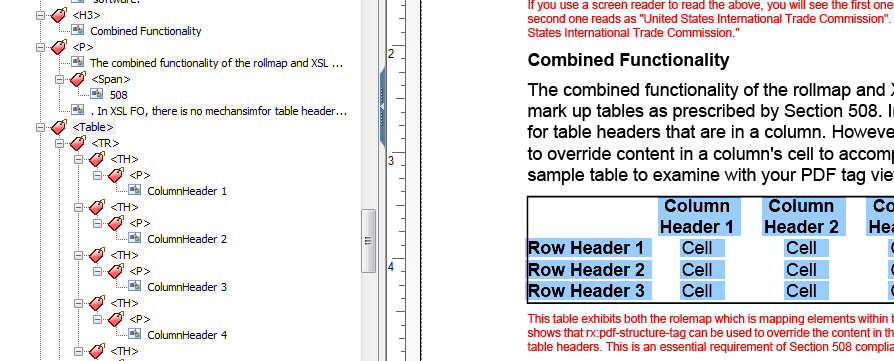
In accessible PDF documents we handle proper pronunciation of terms like "RenderX" and "508" with some additional "Span" elements which have a minimal hierarchy.
Note: Adobe Acrobat's 'Accessibility check' plug-in fails if some table cells do not have a table row as the parent. Make sure that all table cells in your XSL-FO file are within table rows.
G.4. XSL-FO Extensions
For those capabilities required to meet Section 508 requirements that are outside XSL-FO or cannot be interpreted through the rolemap.xml, RenderX implemented extensions in XSL-FO so that the user can produce fully compliant tagged PDF files. These extensions include PDF Structure Tag, PDF Artifact Type and Subtype, Alternate Description, Actual Text and Abbreviations.
G.4.1. PDF Structure Tag
RenderX implemented an extension attribute rx:pdf-structure-tag that is allowed at the lowest level where content is formatted to output. This attribute allows the user to spot remap some piece of content to the proper (intended) PDF tag, that is, it sets the name tag ('tag'/'tag mapping') of the given structural element in the output document.
This same extension attribute also allows the user to mark content as a PDF artifact. By using the special value for rx:pdf-structure-tag of "Artifact", the user can control information which is not intended to be included in the tag structure or reading of a document when using read out loud in Acrobat/JAWS. The rx:pdf-structure-tag attribute can also be set to either "TH"/ "TR", these values are for table header cells. "TH"/ "TR" marks these cells as 'column'/'row' respectively (in the table properties for accessible documents).
If Accessibility support is enabled, the formatter automatically marks entities within <fo:table> unless the document overrides it.
See Section G.4.6 for implementation details and full example.
The most common use is to map an <fo:block> to tagged PDF headings like "H1" to "H6". This is required because there is no direct equivalent in XSL-FO, all of these are merely <fo:block> elements. There is no way to truly understand which <fo:block> is an "H1" or an "H3" or a "P". Now, you can simply mark an <fo:block> with rx:pdf-structure-tag and set the value to your intended PDF tag like "H1".
The valid values for the rx:pdf-structure-tag attribute are "H1", "H2", "H3", "H4", "H5", "H6", "P" , "TH", "TR", "TD", or "Artifact".
The Syntax for the rx:pdf-structure-tag attribute is:
<fo:block rx:pdf-structure-tag="H1">
  This is block tagged with Heading 1
</fo:block>
G.4.2. PDF Artifact Type and Subtype
RenderX has implemented two additional attributes that apply only to something classified as a PDF artifact. These two extensions, rx:pdf-artifact-type and rx:pdf-artifact-subtype allow the user to further classify artifacts. It should be noted that these are optional according to the PDF specification.
The valid values for the type of an artifact are "Pagination", "Page" or "Layout". "Pagination" is used for artifacts that are the direct result of the formatter's pagination of the document and they should (must) not be included in the PDF tag structure or reading. Running and headers and footers are force marked with rx:pdf-structure-tag of "Artifact" and rx:pdf-artifact-type of "Pagination" during output of the tagged PDF. "Page" artifacts are normally used for something on a page like colored boxes and "Layout" artifacts are used for things like table borders.
If the rx:pdf-artifact-type is "Pagination", then the user can further classify a subtype. The valid values for rx:pdf-artifact-subtype are "Header", "Footer" or "Watermark".
The syntax of the rx:pdf-artifact-type is:
<fo:block rx:pdf-structure-tag="Artifact"
          rx:pdf-artifact-type="Layout">
    1.
</fo:block>
Or when Artifact Type and Subtype are used together:
<fo:block rx:pdf-structure-tag="Artifact"
          rx:pdf-artifact-type="Pagination"
          rx:pdf-artifact-subtype="Watermark">
    mark
</fo:block>
G.4.3. Alternate Description
Basically, Alternate Description implements the concept of Tooltip feature.
Normally used with images, the rx:alt-description extension attribute allows you to assign alternate text to something that is not normally read out loud. Once the screen reader encounters the image that contains an alternate description, its text is read out loud to the user.
Alternate Description is one of the key parts of Section 508 document compliance strategy.
The syntax of the rx:alt-description is:
<fo:external-graphic
        src="url('tags.png')"
        rx:alt-description="This is an image showing the tagging structure of this document."
/>
Figure G.1. The document structure
 |
When the example <fo:external-graphic> code above runs, the PDF document would show the image above and the screen reader would read "This is an image showing the tagging structure of this document." in lieu of the image.
The extension rx:alt-description can also be used for marking PDF Form Fields.
G.4.4. Actual Text
The extension rx:actual-text allows the user to change what is read for some text content that is displayed in the PDF. This is most commonly used to read numbers in a special way, overriding the behavior of some screen readers from assuming a string of things is a number. Since this can be misinterpreted, it is best to override what is read to the user.
The syntax of the rx:actual-text attribute is shown in the example below:
<fo:inline rx:actual-text="5,O,8">508</fo:inline>
The following shows two ways of formatting some numbers that appear exactly the same in context of the PDF. If you allow a screen reader to read them out loud, you will see the difference:
-
No actual text: 12345678910
-
With actual text: 1,2,3,4,5,6,7,8,9,10.
Note: The example with no actual text will attempt to read as a number. You would hear twelve billion, three hundred forty five million, six hundred seventy eight thousand nine hundred ten. The example with actual text is formatted with
rx:actual-text="1,2,3,4,5,6,7,8,9,10."and would be read exactly like it is intended: one, two, three, ... Actual text is used throughout this document within content that is being read to clarify how it should be read, like for the terms Section 508 and RenderX.
G.4.5. Abbreviations
The extension rx:abbreviation allows you to mark content that is an abbreviation with an appropriate text to be read out loud.
The syntax of this is:
<fo:inline rx:abbreviation="United States Health and Human Services">
    US H&HS
</fo:inline>
Which will produce text - US H&HS - when rendered to PDF with IREn and the screen reader would read it as "United States Health and Human Services".
G.4.6. Tables
RenderX internally already understands the content with the "table-header" XSL FO tag should be marked as "TH" in the tagged PDF result. The user does not need to do anything special except to use "table-header" structure in their XSL FO. The combined functionality of the rolemap.xml and XSL-FO extensions allows the user to mark up tables as prescribed by Section 508.
The default markup as follows:
-
table:TH -
table-header/table-row:TH -
table-body/table-row:TR -
table-cell:TD
One typical problem when overriding markup is required is when first cells in data row actually contain a header associated with the following cells. XSL-FO has no mechanism for marking table headers that are in a column. However, HTML has, and the Section 508 specification allows for this. In this case, the corresponding <fo:table-cell> can be marked with rx:pdf-structure-tag="TH" .
The code below shows an example table that exhibits both the rolemap which is mapping elements within this table header rows to be classified as "TH" and also shows that <rx:pdf-structure-tag> can be used to override the content in the first column of cells to map them also as row-based table headers. This is an essential requirement of Section 508 compliance.
<fo:table text-align="center" border="1pt solid black"
space-before="6pt">
<fo:table-header font-weight="bold">
<fo:table-row>
<fo:table-cell id="column0">
<fo:block margin="2pt"> </fo:block>
</fo:table-cell>
<fo:table-cell id="column1">
<fo:block margin="2pt">Column Header 1</fo:block>
</fo:table-cell>
<fo:table-cell id="column2">
<fo:block margin="2pt">Column Header 2</fo:block>
</fo:table-cell>
<fo:table-cell id="column3">
<fo:block margin="2pt">Column Header 3</fo:block>
</fo:table-cell>
</fo:table-row>
</fo:table-header>
<fo:table-body>
<fo:table-row>
<fo:table-cell font-weight="bold">
<fo:block rx:pdf-structure-tag="TH"
margin-left="2pt">Row Header 1</fo:block>
</fo:table-cell>
<fo:table-cell rx:header-idref="column1">
<fo:block>Cell</fo:block>
</fo:table-cell>
<fo:table-cell rx:header-idref="column2">
<fo:block>Cell</fo:block>
</fo:table-cell>
<fo:table-cell rx:header-idref="column3">
<fo:block>Cell</fo:block>
</fo:table-cell>
</fo:table-row>
<fo:table-row>
<fo:table-cell font-weight="bold">
<fo:block rx:pdf-structure-tag="TH"
margin-left="2pt">Row Header 2</fo:block>
</fo:table-cell>
<fo:table-cell rx:header-idref="column1">
<fo:block>Cell</fo:block>
</fo:table-cell>
<fo:table-cell rx:header-idref="column2">
<fo:block>Cell</fo:block>
</fo:table-cell>
<fo:table-cell rx:header-idref="column3">
<fo:block>Cell</fo:block>
</fo:table-cell>
</fo:table-row>
<fo:table-row>
<fo:table-cell font-weight="bold">
<fo:block rx:pdf-structure-tag="TH"
margin-left="2pt">Row Header 3</fo:block>
</fo:table-cell>
<fo:table-cell rx:header-idref="column1">
<fo:block>Cell</fo:block>
</fo:table-cell>
<fo:table-cell rx:header-idref="column2">
<fo:block>Cell</fo:block>
</fo:table-cell>
<fo:table-cell rx:header-idref="column3">
<fo:block>Cell</fo:block>
</fo:table-cell>
</fo:table-row>
</fo:table-body>
</fo:table>
In XSL-FO, there is no mechanism for referring to data table cells in header table cells. The user can use rx:header-idref to refer header table cells by their id (a common 'id-refid' mechanism), which allows for better control of reading order.
G.5. RenderX IREn rolemap.xml
Within IREn, there is a separate, customizable file called rolemap.xml. It serves two different purposes. It allows the user to:
-
Map common XSL-FO structures to different PDF tags. Simple examples would be an
<fo:root>becomes a "Document" or an<fo:block>becomes a "P". Therolemap.xmlallows the user to define these for the output. -
Define structures that are excluded from the tagging. This is a very important feature for compliance. Using the
rolemap.xml, the user can specify XSL-FO structures to exclude from the tagging of the output. These would be common XSL-FO structures that really do not contribute to the structure but are in place because of the XSL-FO specification. Examples would be<fo:flow>and<fo:static-content>tags. This greatly simplifies the structure of the tagged PDF per the requirements of Section 508.
Using rolemap.xml
The user can set tag mapping on the document level (document-level; unlike @rx:pdf-structure-tag, which is element-level).
Using a set of <structure-element> in rolemap.xml - just change @role-mapping for corresponding element.
The user also can exclude or 'roll up' any element from the PDF 'structure' ('tagged structure') by commenting out the corresponding structure-elements element in rolemap.xml
The <structure-elements standard="true"> section and aliases (the 'structure-alias' elements) in rolemap.xml are mainly for compatibility with older versions of role mapping in IREn. They should not be touched!
Below is the code from the current rolemap.xml file in full that ships with RenderX IREn:
<?xml version="1.0" encoding="UTF-8"?>

<role-map xmlns="http://www.renderx.com/XEP/config">

  <!-- ======================================================= -->
  <!-- PDF Structure Types                                     -->
  <!-- ======================================================= -->

  <!-- Maps input XSL-FO elements to the PDF structure types -->

  <structure-elements>
    <structure-element name="root"
                       role-mapping="Root"/>
    <structure-element name="page-sequence"
                       role-mapping="PageSequence"/>
    <structure-element name="block"
                       role-mapping="Block"/>
    <structure-element name="leader"
                       role-mapping="Leader"/>
    <structure-element name="page-number"
                       role-mapping="PageNumber"/>
    <structure-element name="page-number-citation"
                       role-mapping="PageNumberCitation"/>
    <structure-element name="page-number-citation-last"
                       role-mapping="PageNumberCitationLast"/>
    <structure-element name="external-graphic"
                       role-mapping="ExternalGraphic"/>
    <structure-element name="instream-foreign-object"
                       role-mapping="InstreamForeignObject"/>
    <structure-element name="basic-link"
                       role-mapping="BasicLink"/>
    <structure-element name="footnote"
                       role-mapping="Footnote"/>
    <structure-element name="footnote-label"
                       role-mapping="FootnoteLabel"/>
    <structure-element name="footnote-body"
                       role-mapping="FootnoteBody"/>
    <structure-element name="list-block"
                       role-mapping="ListBlock"/>
    <structure-element name="list-item"
                       role-mapping="ListItem"/>
    <structure-element name="list-item-label"
                       role-mapping="ListItemLabel"/>
    <structure-element name="list-item-body"
                       role-mapping="ListItemBody"/>
    <structure-element name="table"
                       role-mapping="Table"/>
    <structure-element name="table-row"
                       role-mapping="TableRow"/>
    <structure-element name="header-table-cell"
                       role-mapping="HeaderTableCell"/>
    <structure-element name="body-table-cell"
                       role-mapping="BodyTableCell"/>
    <structure-element name="footer-table-cell"
                       role-mapping="FooterTableCell"/>
    <structure-element name="flow"
                       role-mapping="Flow"/>
    <structure-element name="static-content"
                       role-mapping="StaticContent"/>
    <structure-element name="flow-section"
                       role-mapping="FlowSection"/>
    <structure-element name="block-container"
                       role-mapping="BlockContainer"/>
    <structure-element name="inline"
                       role-mapping="Inline"/>
    <structure-element name="wrapper"
                       role-mapping="Wrapper"/>
    <structure-element name="table-header"
                       role-mapping="TableHeader"/>
    <structure-element name="table-body"
                       role-mapping="TableBody"/>
    <structure-element name="table-footer"
                       role-mapping="TableFooter"/>
    <structure-element name="ruler"
                       role-mapping="Ruler"/>
  </structure-elements>

  <!-- Standard structure types -->
  <structure-elements standard="true">
    <!-- Grouping elements -->
    <structure-element name="Document" />
    <structure-element name="Part" />
    <structure-element name="Art" />
    <structure-element name="Div" />
    <structure-element name="Sect" />
    <structure-element name="BlockQuote" />
    <structure-element name="Caption" />
    <structure-element name="TOC" />
    <structure-element name="TOCI" />
    <structure-element name="Index" />
    <structure-element name="NonStruct" />
    <structure-element name="Private" />
    <!-- Paragraphlike elements -->
    <structure-element name="P" />
    <structure-element name="H" />
    <structure-element name="H1" />
    <structure-element name="H2" />
    <structure-element name="H3" />
    <structure-element name="H4" />
    <structure-element name="H5" />
    <structure-element name="H6" />
    <!-- List elements -->
    <structure-element name="L" />
    <structure-element name="LI" />
    <structure-element name="Lbl" />
    <structure-element name="LBody" />
    <!-- Table elements -->
    <structure-element name="Table" />
    <structure-element name="TR" />
    <structure-element name="TH" />
    <structure-element name="TD" />
    <structure-element name="THead" />
    <structure-element name="TBody" />
    <structure-element name="TFoot" />
    <!-- Inline-level elements -->
    <structure-element name="Span" />
    <structure-element name="Quote" />
    <structure-element name="Note" />
    <structure-element name="Reference" />
    <structure-element name="BibEntry" />
    <structure-element name="Code" />
    <structure-element name="Link" />
    <structure-element name="Annot" />
    <structure-element name="Ruby" />
    <structure-element name="Warichu" />
    <!-- Illustration elements -->
    <structure-element name="Figure" />
    <structure-element name="Formula" />
    <structure-element name="Form" />
    <!-- 'Artifact' is a special value -->
    <structure-element name="Artifact" />
  </structure-elements>

  <!-- The aliases for XEP structure types -->
    <structure-alias name="Root" value="Document"/>
    <structure-alias name="PageSequence" value="Part"/>
    <structure-alias name="Flow" value="Sect"/>
    <structure-alias name="StaticContent" value="Sect"/>
    <structure-alias name="FlowSection" value="Sect"/>
    <structure-alias name="BlockContainer" value="Div"/>
    <structure-alias name="Block" value="P"/>
    <structure-alias name="Inline" value="Span"/>
    <structure-alias name="Wrapper" value="Span"/>
    <structure-alias name="Leader" value="Span"/>
    <structure-alias name="Ruler" value="Span"/>
    <structure-alias name="PageNumber" value="Quote"/>
    <structure-alias name="PageNumberCitation" value="Quote"/>
    <structure-alias name="PageNumberCitationLast" value="Quote"/>
    <structure-alias name="ExternalGraphic" value="Figure"/>
    <structure-alias name="InstreamForeignObject" value="Figure"/>
    <structure-alias name="BasicLink" value="Link"/>
    <structure-alias name="Footnote" value="Note"/>
    <structure-alias name="FootnoteLabel" value="Span"/>
    <structure-alias name="FootnoteBody" value="Sect"/>
    <structure-alias name="ListBlock" value="L"/>
    <structure-alias name="ListItem" value="LI"/>
    <structure-alias name="ListItemLabel" value="Lbl"/>
    <structure-alias name="ListItemBody" value="LBody"/>
    <structure-alias name="Table" value="Table"/>
    <structure-alias name="TableRow" value="TR"/>
    <structure-alias name="HeaderTableCell" value="TH"/>
    <structure-alias name="BodyTableCell" value="TD"/>
    <structure-alias name="FooterTableCell" value="TD"/>
    <structure-alias name="TableHeader" value="THead"/>
    <structure-alias name="TableBody" value="TBody"/>
    <structure-alias name="TableFooter" value="TFoot"/>
</role-map>
G.6. Hints and Tips
There are a few other things to consider in the setup of RenderX IREn software for proper processing of Section 508 compliant documents.
-
Try to use the base 14 fonts and avoid using custom fonts. Because of the nature of custom font processing and requirements special spacing between words, many custom fonts will cause document sizes to increase considerably over using built-in fonts (Helvetica, Times, Courier).
-
Turn off kerning. Font kerning causes many fragments of text in the output PDF, as they must all be placed individually to account for the kerning. While it improves the visual appearance, it may generate unwanted effects like a longer word being read as two smaller words. Setting KERN as "false" in the setup file should turn off font kerning.
-
Avoid nested blocks as they clutter the PDF structure and trigger structure verification errors.
You should avoid the use of nested
<fo:block>elements as they are really unnecessary. This by nature would lead to nested "P" elements in the tagged PDF. While not a violation, it can certainly be avoided by structuring the input FO without nested<fo:block>elements. -
Ensure the proper tab order. Tab Order field is a feature of PDF Version 1.5+. If the output document is generated for PDF 1.4, Acrobat 7 and 8 would report "page(s) with tab order that may be inconsistent with the structure order". IREn would report a runtime warning about use it against PDF 1.4.
Besides the Adobe Preflight, there are other PDF Accessibility validation tools, which may have stricter requirements for documents to pass validation. Such tools include veraPDF (https://verapdf.org/). and PDF Accessibility Checker (PAC3) (http://www.access-for-all.ch/en/pdf-lab/pdf-accessibility-checker-pac.html). Following are several Content checkpoints that may report failure with these tools, and suggestions for fixing it:
-
PDF/UA identifier missing: PDF/UA identifier must be specified in document's XMP data. By default, IREn adds a minimal data, but it also allows for overriding the entire XMP metadata as shown in the example below:
<fo:root xmlns:fo="http://www.w3.org/1999/XSL/Format"
   xmlns:rx="http://www.renderx.com/XSL/Extensions">
   <rx:meta-info>
      <rx:custom-meta><![CDATA[
<rdf:Description rdf:about=""...
...
</rdf:Description>
]]>
      </rx:custom-meta>
   </rx:meta-info>
...
Note: The Custom XMP metadata overrides
<rx:meta-field>defined in Section B.1. As the data is represented in a single block, one should be extremely careful specifying correct technical fields like Producer, CreationDate, ModDate, etc.The actual metadata may vary depending on the document's needs. Here's the minimal data to satisfy the PAC3 check:
Note: Here and below, the "
•" symbol represents the Unicode "zero width non-breaking space character" (U+FEFF) used as a byte-order marker.<?xpacket begin="•" id="W5M0MpCehiHzreSzNTczkc9d"?> <x:xmpmeta xmlns:x="adobe:ns:meta/" x:xmptk="Adobe XMP Core 5.6-c017 91.164464, 2020/06/15-10:20:05"> <rdf:RDF xmlns:rdf="http://www.w3.org/1999/02/22-rdf-syntax-ns#"> <rdf:Description rdf:about="" xmlns:dc="http://purl.org/dc/elements/1.1/" xmlns:pdf="http://ns.adobe.com/pdf/1.3/" xmlns:xmp="http://ns.adobe.com/xap/1.0/" xmlns:pdfuaid="http://www.aiim.org/pdfua/ns/id/"> <dc:format>application/pdf</dc:format> <dc:title> <rdf:Alt> <rdf:li xml:lang="x-default">Document title</rdf:li> </rdf:Alt> </dc:title> <dc:creator> <rdf:Seq> <rdf:li>Unknown</rdf:li> </rdf:Seq> </dc:creator> <pdf:Producer>XEP 4.31.529</pdf:Producer> <pdf:Trapped>Unknown</pdf:Trapped> <xmp:CreatorTool>Unknown</xmp:CreatorTool> <pdfuaid:part>1</pdfuaid:part> </rdf:Description> </rdf:RDF> </x:xmpmeta> <?xpacket end="w"?>And here's a more sophisticated one that defines a PDF-A extension schema:
<?xpacket begin="•" id="W5M0MpCehiHzreSzNTczkc9d"?> <x:xmpmeta xmlns:x="adobe:ns:meta/" x:xmptk="Adobe XMP Core 5.6-c017 91.164464, 2020/06/15-10:20:05"> <rdf:RDF xmlns:rdf="http://www.w3.org/1999/02/22-rdf-syntax-ns#"> <rdf:Description rdf:about="" xmlns:dc="http://purl.org/dc/elements/1.1/" xmlns:pdf="http://ns.adobe.com/pdf/1.3/" xmlns:xmp="http://ns.adobe.com/xap/1.0/" xmlns:pdfaExtension="http://www.aiim.org/pdfa/ns/extension/" xmlns:pdfaSchema="http://www.aiim.org/pdfa/ns/schema#" xmlns:pdfaProperty="http://www.aiim.org/pdfa/ns/property#" xmlns:pdfuaid="http://www.aiim.org/pdfua/ns/id/"> <dc:format>application/pdf</dc:format> <dc:title> <rdf:Alt> <rdf:li xml:lang="x-default">Document title</rdf:li> </rdf:Alt> </dc:title> <dc:creator> <rdf:Seq> <rdf:li>Unknown</rdf:li> </rdf:Seq> </dc:creator> <pdf:Producer>XEP 4.31.529</pdf:Producer> <pdf:Trapped>Unknown</pdf:Trapped> <xmp:CreatorTool>Unknown</xmp:CreatorTool> <pdfuaid:part>1</pdfuaid:part> <pdfaExtension:schemas> <rdf:Bag> <rdf:li rdf:parseType="Resource"> <pdfaSchema:schema> PDF/UA Universal Accessibility Schema </pdfaSchema:schema> <pdfaSchema:namespaceURI> http://www.aiim.org/pdfua/ns/id/ </pdfaSchema:namespaceURI> <pdfaSchema:prefix>pdfuaid</pdfaSchema:prefix> <pdfaSchema:property> <rdf:Seq> <rdf:li rdf:parseType="Resource"> <pdfaProperty:name>part</pdfaProperty:name> <pdfaProperty:valueType>Integer</pdfaProperty:valueType> <pdfaProperty:category>internal</pdfaProperty:category> <pdfaProperty:description> Indicates, which part of ISO 14289 standard is followed </pdfaProperty:description> </rdf:li> </rdf:Seq> </pdfaSchema:property> </rdf:li> </rdf:Bag> </pdfaExtension:schemas> </rdf:Description> </rdf:RDF> </x:xmpmeta> <?xpacket end="w"?> -
Table header cell has no associated subcells: All table header cells (e.g. column headers and row headers, if any) have to be tagged with
rx:header-idrefattribute referring to its header cell. Currently, PAC3 does not support multipleheader-idref's, so one may need to pick either row or column header. Normally, one should refer row header (usually a cell in the first column) if it exists, alternatively it should be the column header (a cell in the first row). Also keep in mind that no cell header should be empty (have no content or regular whitespaces). At least, place an   as the content. See Section G.4.6 for implementation details and full example. -
Alternative description missing for an annotation: This error is caused by an image being the only child of
<fo:basic-link>. To fix it, insert an additional text child element to<<fo:basic-link>>- for example, placenbsp ( )after the image and specifytext-decoration="none"to make thenbspcompletely invisible:<fo:basic-link external-destination="url('https://www.renderx.com/')" rx:alt-description="RenderX logo" text-decoration="none"> <fo:external-graphic src="url('img/renderx-logo.jpg')" rx:alt-description="RenderX logo">   </fo:basic-link> -
"Figure" element on a single page with no bounding box: