
Chapter 1 of the IREn InGrid on Kubernetes
Using IREn InGrid in Kubernetes for XML-to-Print Formatting
RenderX IREn InGrid software can be used in Kubernetes or Docker to dynamically generate hundreds of documents per second using industry-standard REST and SOAP APIs
Using RenderX IREn InGrid in Kubernetes
Modern cloud environments allow for seamless dynamic scaling of workloads and RenderX formatting engine is not an exception.
RenderX's IREn InGrid is used in cloud environments, such as Kubernetes (including GKE, EKS and AKS or private/managed cluster) to format thousands of pages (PDF, PostScript, AFP, and other supported outputs) from customer data using industry standard REST or SOAP APIs while being able to dynamically scale the deployment based on workload and SLA requirements.
In this document we describe a simple scenario for deploying RenderX's IREn InGrid in Kubernetes cluster using simple architecture:
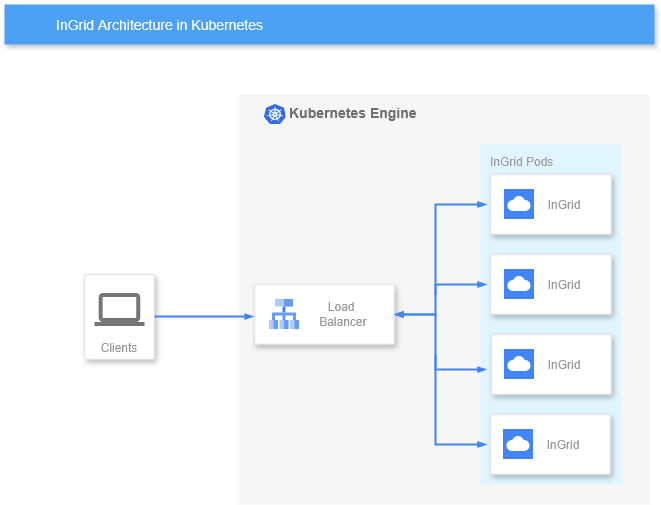
As Kubernetes provides its own TCP load balancing capabilities via LoadBalancer Service that can dynamically adjust to deployment scale change and endpoint health status, it is used as a primary load-balancing component for IREn InGrid deployments in Kubernetes
IREn InGrid containers are used typically in a single Formatter Engine per container configuration, which is a default config for renderx/ingrid docker images. Service exposes port 6677/tcp on the ExternalIP of the LoadBalancer and clients use this IP/port combination to access it and render documents.
Deployment Configuration for RenderX's IREn InGrid in K8s
Reference implementation described here is based on Kubernetes Deployment. Deployment config below assumes that a separate K8s Namespace is used to deploy the application, special Label rx: ingrid is used to select these Pods from the LoadBalancer and initial Deployment scale is 4 Pods:
apiVersion: apps/v1
kind: Deployment
metadata:
  name: rx-ingrid
  namespace: rx-ingrid
  labels:
    rx: ingrid
spec:
  replicas: 4
  selector:
    matchLabels:
      rx: ingrid
  template:
    metadata:
      labels:
        rx: ingrid
    spec:
      containers:
        - name: ingrid
          image: docker.io/renderx/ingrid:1.0.181
          imagePullPolicy: Always
          ports:
            - containerPort: 6677
              name: ingrid-port
          livenessProbe:
            httpGet:
              path: /
              port: 6677
            initialDelaySeconds: 60
            periodSeconds: 90
            timeoutSeconds: 10
This configuration also utilizes a liveness probe to check for container response on REST API port. Note 10 seconds timeoutSeconds value that is long enough for a busy Multiplexor to respond to the livenessProbe; we do not recommend using values less than 5 seconds as it may trigger unnecessary container restarts.
Configure LoadBalancer
We use standard Kubernetes Service configuration that exposes port 6677/tcp on ExternalIP assigned by the cluster. Deployment selection is done via K8s Labels:
apiVersion: v1
kind: Service
metadata:
  name: rx-ingrid
  namespace: rx-ingrid
spec:
  type: LoadBalancer
  selector:
    rx: ingrid
  ports:
    - protocol: TCP
      port: 6677
      targetPort: ingrid-port
You can then access the Deployment via ExlernalIP assigned by the cluster on port 6677/tcp, as well as access it internally using ClusterIP.
Apply Licence and Configuration Files
As renderx/ingrid containers include Trial license only, it is necessary to provide a full product license to the deployed application.
It is also possible to override existing configuration files, fairy.conf and xep.xml. You can use either ConfigMap or Secret to provide this data to the Deployment; as license.xml contains sensitive information we recommend using a Secret to supply your Deployment with it, for other configuration files standard ConfigMap would suffice.
In the examples below we assume that license.xml is provided via Secret and other configuration files using ConfigMaps.
Prerequisites:
Create Kubernetes Secret in the appropriate namespace from license.xml file using standard kubectl syntax:
kubectl create secret generic rx-license --from-file=license.xml --namespace=rx-ingrid
Create Kubernetes ConfigMap in the appropriate namespace from fairy.conf file using standard kubectl syntax:
kubectl create configmap fairy-conf --from-file=fairy.conf --namespace=rx-ingrid
Should you need it, you could also create ConfigMap from xep.xml file to tweak RenderX's IREn Formatter settings using standard kubectl syntax:
kubectl create configmap xep-xml --from-file=xep.xml --namespace=rx-ingrid
You can also use manifests to create the above resources. Once resources has been created, add them to the container spec within the Deployment like this:
...
    spec:
      volumes:
        - name: license-xml
          secret:
            secretName: rx-license
        - name: fairy-conf
          configMap:
            name: fairy-conf
        - name: xep-xml
          configMap:
            name: xep-xml
      containers:
        - name: ingrid
          image: docker.io/renderx/ingrid:1.0.181
          volumeMounts:
            - name: license-xml
              mountPath: /engine/xep/etc/
            - name: fairy-conf
              mountPath: /engine/ingrid/etc/
            - name: xep-xml
              mountPath: /engine/xep/etc/
...
Once the Deployment is restarted, license.xml, fairy.conf and xep.xml files will be replaced by data provided within Secret and ConfigMaps.
Accessing RenderX's IREn InGrid Formatter Service in Kubernetes using REST API
In the examples above the Service publishes a TCP LoadBalancer on port 6677/tcp on an ExternalIP assigned by Cloud Provider and on Cluster IP visible inside the cluster.
You can then use standard IREn InGrid REST or SOAP APIs as described in IREn InGrid Documentation using POST requests to the ExlernalIP:6677 from outside or ClusterIP:6677 from inside the cluster.